
Add a gift link to Instantly campaign steps
Put a personalized GG Link in an Instantly campaign step with Instantly's {{email}} and {{firstName}} variables: a copy-paste template, where to paste it, how to test it and how claims are tagged by campaign.
4 min readUpdated
A GG Link is one link that anyone can open to claim a gift from Gia's Giraffes, within the budget you set. Put it in a Instantly campaign step with Instantly's own merge fields, and each prospect gets a claim page that greets them by first name, with their email already filled in. Every claim is tagged with your campaign, so you can see which campaign step it came from. Setup takes about two minutes, and it works on the Free plan.
The template
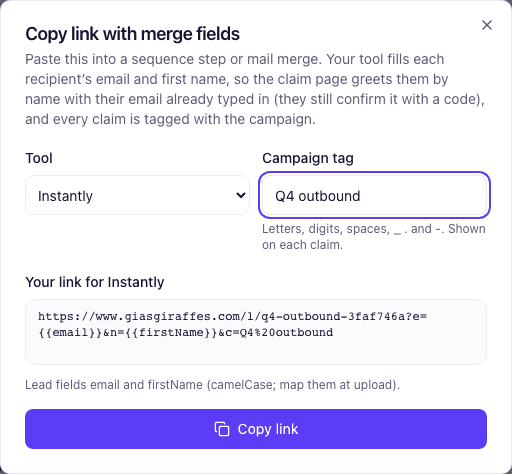
Instantly's lead variables are {{email}} and {{firstName}}. They're camelCase, so map your CSV's columns to them when you upload leads. Paste this link into your campaign step, with your-link replaced by your own link (the dialog below writes it for you):
https://www.giasgiraffes.com/l/your-link?e={{email}}&n={{firstName}}&c=Q4%20outboundefills in the prospect's email. They still confirm it with a 6-digit code before they claim.ngreets them by first name.cis your campaign tag. Only you see it. Spaces are written as%20.
A short email step to start from, ready to paste:
Hi {{firstName}},

Thanks for taking a look at what we do. As a thank-you for your time,
pick a gift on us from small independent brands. You choose what arrives.

Pick your gift: <your link from above>

<your name>What you need
- A Gia's Giraffes account (Free or Pro) with one active GG Link. To make one, open GG Links → New GG Link, then set the budget, the headline and how many people can claim.
- A Instantly account where you can edit campaign steps.
Copy the link in Gia's Giraffes
- Open GG Links and find your active link.
- Click Copy link with merge fields.
- Under Tool, pick Instantly.
- Type a Campaign tag, for example "Q4 outbound". It defaults to the link's name.
- Click Copy link.
Paste it into Instantly
- In Instantly, open the campaign → Sequences and pick the step.
- Write the email, or paste the template above.
- Select the words to link, for example "Pick your gift", click the link button and paste the link.
Before you launch, send a test to yourself from the step, or open the preview for one lead. The link must show a real email and first name in place of {{email}} and {{firstName}}.
See who claimed, by campaign
Every claim lands on the link's card in GG Links, tagged with the campaign you typed:
- The card reads, for example, "12 claims · 3 campaigns". Open it for the count per campaign; claims without a tag are listed as "No campaign".
- See who claimed shows each claimant with a Campaign column and a campaign filter.
- On Pro, the leads CSV has the same Campaign column.
The tag is only for you. Your prospect never sees it.
Automate it with Zapier (Pro)
With a Pro API key, the Gia's Giraffes Zapier app can do two more things. The app is in private beta: ask us for the invite.
A link per lead in a custom variable. Trigger: Google Sheets → New Spreadsheet Row (the list you'll upload), or Instantly's new-lead trigger if your plan has it. Action: Gia's Giraffes → Personalize GG Link for a Contact with the email, first name and campaign. Action: Instantly → Add Lead to Campaign with a custom variable gg_link set to the Personalized URL. The step then links to {{gg_link}}.
Stop the sequence when they claim. Trigger: Gia's Giraffes → GG Link Claimed. Action: Instantly → Update Lead (set the interest status) or pause the lead, found by Recipient Email, so the cold steps stop. Add a Slack message if you like: "{{recipient_first_name}} claimed from {{link_name}}."
Free and Pro
- Free: one active GG Link with up to 5 claims. You can still put that one link in a sequence to any number of prospects, personalized for each.
- Pro: unlimited GG Links with up to 500 claims each, the leads CSV, the API and the Zapier app. $19.99 per user per month, with a 14-day free trial.
On either plan you pay only for gifts that are accepted, and the recipient never sees a price.
FAQ
- Does a prospect need an account to claim a gift from my Instantly email?
- No. They open the link, pick a gift, confirm their email with a 6-digit code and enter a shipping address. They never see a price.
- What happens if the merge fields don't fill in?
- The link still works. An unfilled variable is ignored, so the prospect sees the plain claim page and types their own name and email. Send yourself a test to catch it before the sequence goes out.
- Can a prospect change the email in the link?
- Yes. The email in the link is only a prefill. Whoever claims confirms the address they type with a code, and your link's rules (one gift per email or company, the claim cap) still apply.
- Does putting the link in a sequence count as sending gifts?
- No. Personalizing a link creates nothing and costs nothing. A claim counts toward the link's cap, and you're charged only when a gift is accepted.
- Why camelCase?
- That's how Instantly names its default lead fields: {{firstName}}, not {{first_name}}. If your upload mapped first names to a different field, use that field's name in the link.
Put a gift in your next sequence
GG Links are free to start on Gia’s Giraffes. You pay only for gifts that are accepted, and the price includes shipping and tax.